Tree Examples - Generated Images
Dynamic Images/Pal Avatars/Backgrounds based on an AI response
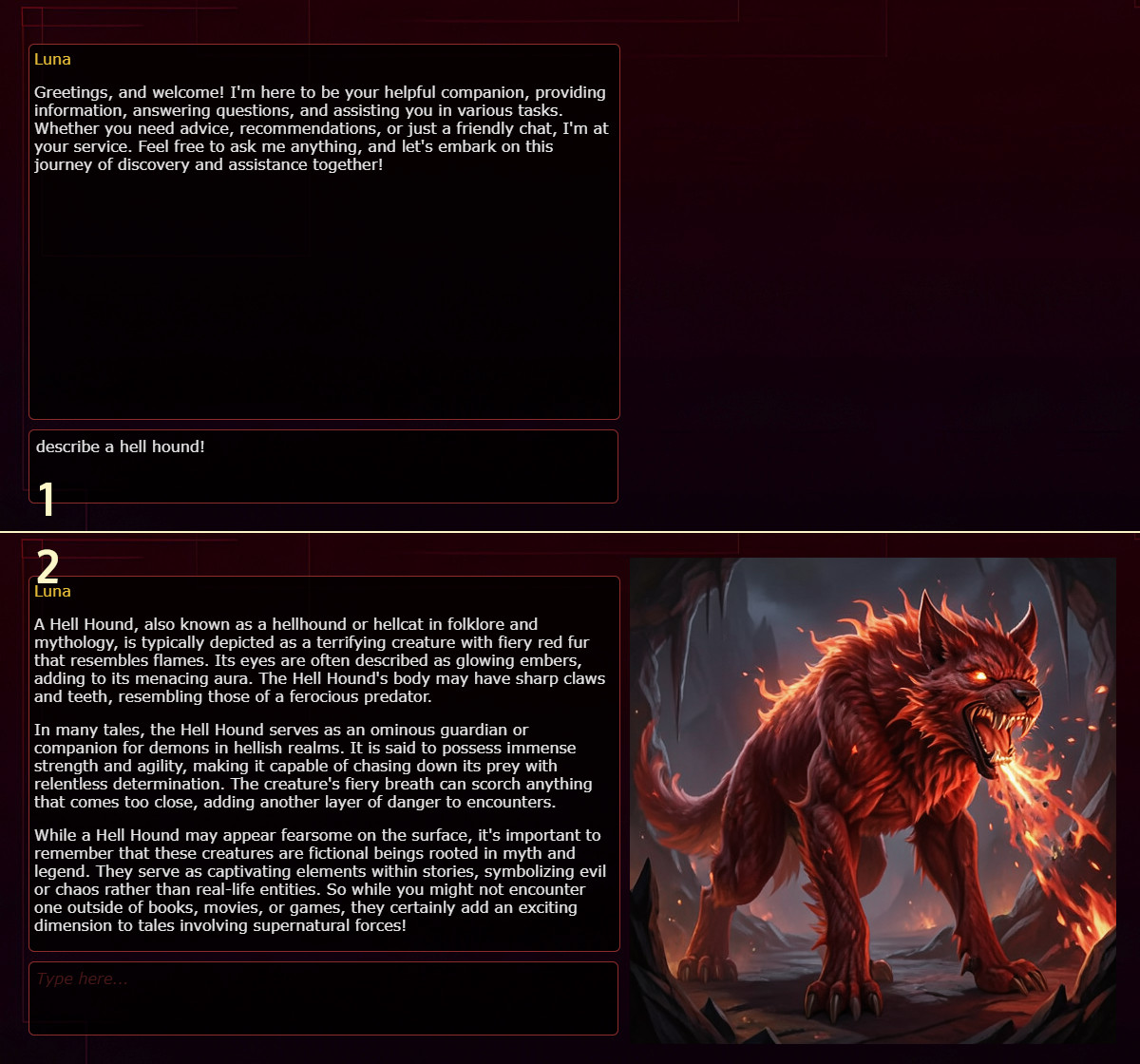
You'll notice the actual behavior is exactly the same as the Paint Example. We just replaced the used tool!
Step 1 - AI Pals Engine
AI Pals Engine must be version 0.8.8.0 or higher.
Step 2 - Image Generation Tool
We need something that generates an image for us. For this example, we'll use the tool AIP-MCP.generate_oai_image, which requires an OAI-compatible image endpoint.
If you don’t have one, download ImgGen Desktop. Launch it and generate a test image to confirm everything works properly. Once you've successfully generated an image, click !Start Server!, then proceed to the next step.
Step 3 - Pal Behavior
- We'll use a default Lightweight Widget (2D should also work).
- Go to Widget Config → UI Panels → Pal Avatar Config → set the Avatar Type to Image (choose Invisible Pixel if you don’t want an image displayed initially).
- Once the Avatar Type is set to Image, you should now be able to click on Behaviors (located on the left side within the Pal Avatar Config).
- The Editor Window will open - click the + (Add Tree) button in the top-left corner to create a new tree.
- Click the Import button at the top, paste the following text, click Import and then SAVE!
[{
  "id": "e4dec150-77bb-4cf2-814a-40ff43e77fb1",
  "name": "",
  "type": "RunAllComposite",
  "children": [
    {
      "id": "42177ff7-5942-4e34-aa70-bb5a9ab75cc9",
      "name": "",
      "type": "SequenceComposite",
      "children": [
        {
          "id": "4b351617-bb8e-4506-929f-f2b888af013e",
          "name": "",
          "type": "GetLastEventDataAction",
          "children": [],
          "properties": {
            "eventId": 28,
            "palIdFilter": "",
            "messageIdFilter": ""
          },
          "isDisabled": false
        },
        {
          "id": "ceb76261-6917-49d9-bff6-5d8bd7bcaeb3",
          "name": "",
          "type": "SetTextAction",
          "children": [],
          "properties": {
            "replacementText": "",
            "appendText": "\",\"model\":\"default\",\"apiKey\":\"dummy\",\"size\":\"512x512\"}}",
            "prependText": "{\"method\": \"AIP-MCP.generate_oai_image\", \"params\": {\"uri\":\"http://localhost:8002/v1\",\"prompt\":\"Generate a DnD image of the following scene: "
          },
          "isDisabled": false
        },
        {
          "id": "4beeb1f7-cffb-4967-8883-d057097d6960",
          "name": "",
          "type": "McpAction",
          "children": [],
          "properties": {
            "method": "",
            "messageId": ""
          },
          "isDisabled": false
        }
      ],
      "properties": {},
      "isDisabled": false
    },
    {
      "id": "35645790-5b69-48f5-a744-ebdbfb411bc7",
      "name": "",
      "type": "SequenceComposite",
      "children": [
        {
          "id": "5fb36580-1cbb-4025-9d13-70d9700efefc",
          "name": "",
          "type": "GetLastEventDataAction",
          "children": [],
          "properties": {
            "eventId": 21,
            "palIdFilter": "",
            "messageIdFilter": ""
          },
          "isDisabled": false
        },
        {
          "id": "039bff06-4c74-4b66-9bc4-430dee9c0909",
          "name": "",
          "type": "SetPalAvatarAction",
          "children": [],
          "properties": {
            "assetId": ""
          },
          "isDisabled": false
        }
      ],
      "properties": {},
      "isDisabled": false
    }
  ],
  "properties": {},
  "isDisabled": false
}]
- That's all, this behavior triggers the image generation immediately after the AI finishes producing a new message. Once the app completes generating the image, it will replace the current invisible pixel or existing image with the new one.
VRAM management is critical. Give both enough or watch one ragequit mid-operation.
- The SetText Node includes the text: "Generate a DnD image of the following scene: [AI Output gets inserted afterwards]" You're welcome to customize this prompt for a specific style (e.g. "in the style of watercolor", "dramatic lighting" etc.)
- If you don't see the node, click Fit View in the bottom-left corner of the editor window to adjust the viewport.
- The size is set to 512x512, change it to 1024x1024 (default size, but slower)
Let me know if you encounter any bugs or unclear steps!
More Details in case you want to modify it
Details
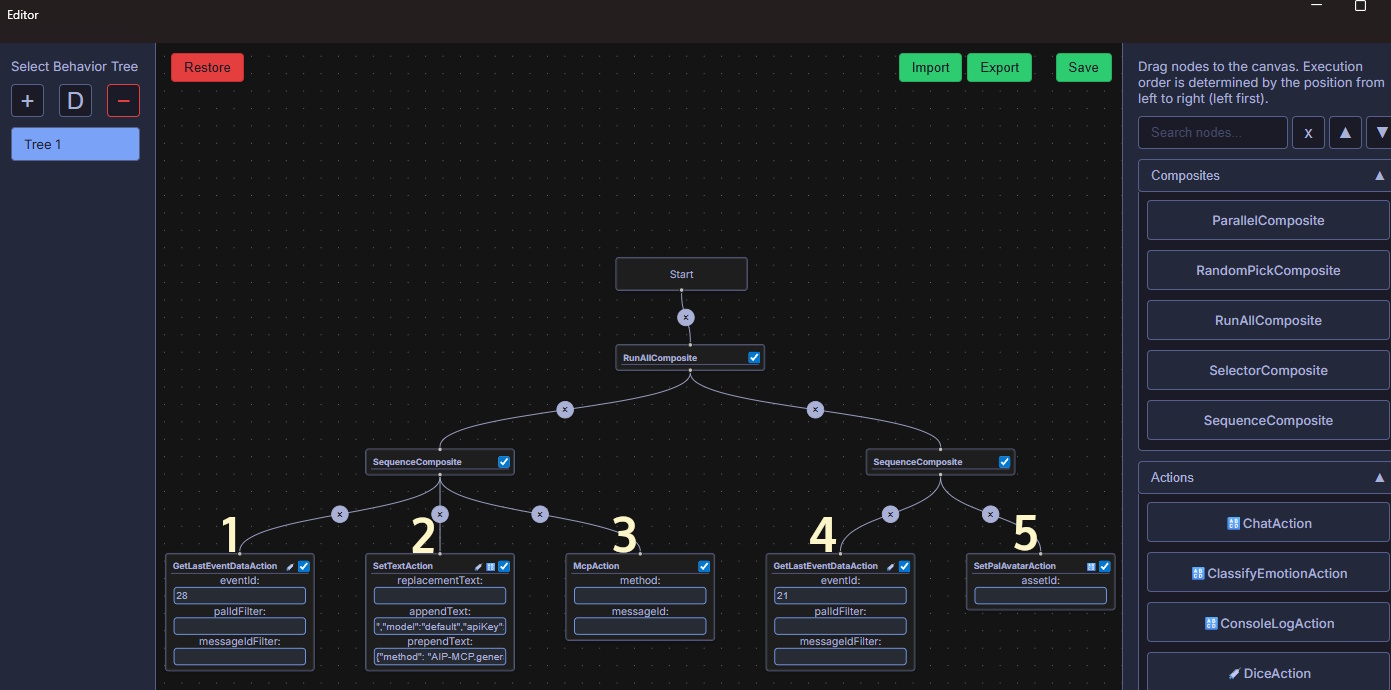
- We proceed here when the event 28 triggers (AI Message Completed)
- We replace the node flow text (The AI message at that moment) with a fully formatted MCP tool call method. Via prepending and appending the necessary instructions, including address, size and any required parameters.
- The Empty MCP Action reads the method from the node flow text and executes it
- This triggers when the MCP Tool Call Result is received, the result is then injected back into the node flow text
- Since the tool call result is already the generated image, we simply use the SetPalAvatarAction to display the new image.
If you'd prefer to trigger this functionality manually instead of automatically:
- Save the AI-generated message into a state variable.
- Initiate the tool call via an action button trigger
Alternative version using HTTP POST
Details
[{
  "id": "e4dec150-77bb-4cf2-814a-40ff43e77fb1",
  "name": "",
  "type": "RunAllComposite",
  "children": [
    {
      "id": "42177ff7-5942-4e34-aa70-bb5a9ab75cc9",
      "name": "",
      "type": "SequenceComposite",
      "children": [
        {
          "id": "4b351617-bb8e-4506-929f-f2b888af013e",
          "name": "",
          "type": "GetLastEventDataAction",
          "children": [],
          "properties": {
            "eventId": 28,
            "palIdFilter": "",
            "messageIdFilter": ""
          },
          "isDisabled": false
        },
        {
          "id": "ceb76261-6917-49d9-bff6-5d8bd7bcaeb3",
          "name": "",
          "type": "SetTextAction",
          "children": [],
          "properties": {
            "replacementText": "",
            "appendText": "\\\",\\r\\n    \\\"steps\\\": 5\\r\\n}\",\"contentType\":\"application/json\"}}",
            "prependText": "{\"method\": \"AIP-MCP.post_to_url_simple\", \"params\": {\"url\":\"https://a658de01e56c59d24e.gradio.live/sdapi/v1/txt2img\",\"body\":\"{\\r\\n    \\\"prompt\\\": \\\"Generate a DnD image from the following scene: "
          },
          "isDisabled": false
        },
        {
          "id": "4beeb1f7-cffb-4967-8883-d057097d6960",
          "name": "",
          "type": "McpAction",
          "children": [],
          "properties": {
            "method": "",
            "messageId": ""
          },
          "isDisabled": false
        }
      ],
      "properties": {},
      "isDisabled": false
    },
    {
      "id": "35645790-5b69-48f5-a744-ebdbfb411bc7",
      "name": "",
      "type": "SequenceComposite",
      "children": [
        {
          "id": "5fb36580-1cbb-4025-9d13-70d9700efefc",
          "name": "",
          "type": "GetLastEventDataAction",
          "children": [],
          "properties": {
            "eventId": 21,
            "palIdFilter": "",
            "messageIdFilter": ""
          },
          "isDisabled": false
        },
        {
          "id": "995ff283-91aa-4312-9281-d698847a2212",
          "name": "",
          "type": "JsonExtractAction",
          "children": [],
          "properties": {
            "jsonPath": "images[0]"
          },
          "isDisabled": false
        },
        {
          "id": "5a716f7d-69b7-4a9c-b00f-00c02ad4be86",
          "name": "",
          "type": "SetTextAction",
          "children": [],
          "properties": {
            "replacementText": "",
            "appendText": "",
            "prependText": "data:image/png;base64,"
          },
          "isDisabled": false
        },
        {
          "id": "039bff06-4c74-4b66-9bc4-430dee9c0909",
          "name": "",
          "type": "SetPalAvatarAction",
          "children": [],
          "properties": {
            "assetId": ""
          },
          "isDisabled": false
        }
      ],
      "properties": {},
      "isDisabled": false
    }
  ],
  "properties": {},
  "isDisabled": false
}]